How do I deep analyze a video in the Videos tab?
VideosUpdated October 2, 2026
Deep analyzing a video
A deep analysis breaks a video down into a summary, transcript, idea analysis, hook, storytelling format and visual layout, and each analysis uses 1 credit.
Steps to deep analyze a video
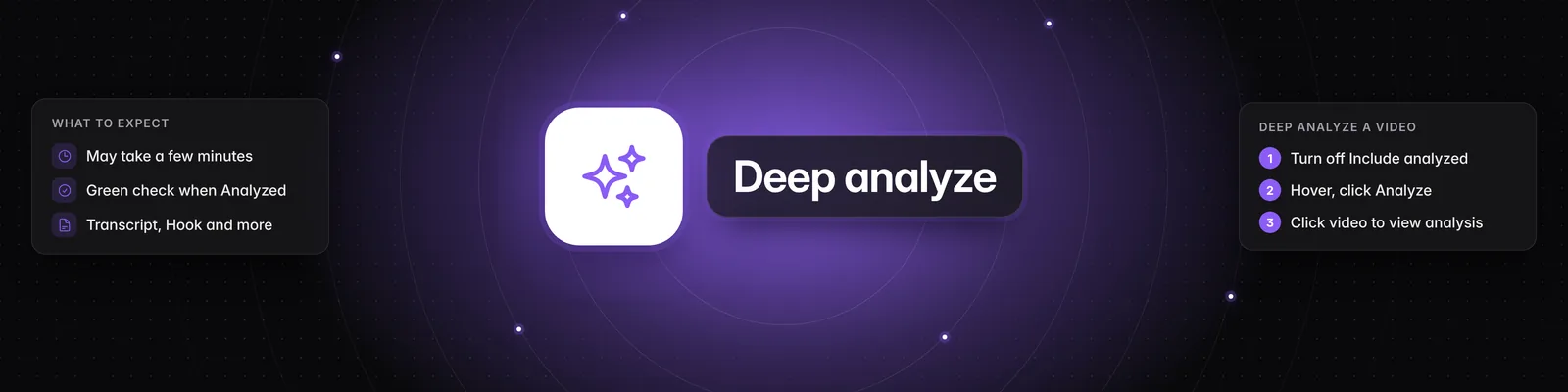
- Show the videos you haven't analyzed yet. In the Videos tab, find Browsing mode in the Filters panel on the left. Click the middle icon, Your personalized feed, then turn off Include analyzed.
- Hover over each Browsing mode icon to see its name. If you don't see the Filters panel, click the funnel icon (Filters) at the top of the page.
- Hover over the video you want and click Analyze. A Queued for analysis message confirms it's been added.
- Wait for the analysis to finish. The card shows Queued while it waits its turn, then Analyzing with a progress bar. This may take a few minutes. You'll be notified when it's ready.
- Click the video once its card shows a green Analyzed label. You'll see a Summary and the Transcript, Idea Analysis, Hook, Storytelling Format and Visual Layout tabs. To learn more about these, see How to use the Video Detail Page in Sandcastles.
Each analyzed video is also added to Ideas > Inbox.
See all your analyzed videos
Under Browsing mode, click the icon on the right, Your analyzed library. It shows only videos that have been analyzed.
Important notes
- Credits: Each analysis uses 1 credit. If you don't have enough, you'll see Out of credits and the video won't be analyzed. See How does the credit system work?.
- Many videos at once: On Pro, Visionary and Titan, use Bulk Analyze to queue up to 100 videos in one go. See How to bulk analyze multiple videos simultaneously.
- Failed analyses: If a card shows Failed to analyze, click it to see why. See Why did my video analysis fail? for what each message means and when your credit is returned.
- Workspace guests: Guests have read-only access, so they can't analyze videos.
If you have any questions, please reach out to support@sandcastles.ai.